• Resources
    • Complimentary Ebooks
      • Defining Your Market Position
      • Value Driven Design
      • 5-Part Blog Format for Every Article
      • Guide to Web Videography
      • Web Photography Handbook
      • Guide to Inbound Marketing
      • Beginner’s Guide to SEO
      • Complete SEO Checklist
      • Which Social Media Platforms Should I Use?
      • 6 Key Marketing Metrics
      • What is Inbound Marketing?
      • Online Fundraising Websites
    • Marketing Tools
      • Marketing Evaluation Form
      • Is Inbound a Good Fit?
      • Inbound Marketing Calculator
      • Defining Buyer Personas
    • Videos
      • Why Consider Partnership with WDP?
      • Keynote Presentation: Management Company Marketing Plan
      • How to Add or Claim Your Business in Google Maps
      • How Great Leaders Inspire Action
      • How Google Search Works
      • Day Trading Attention – Gary Vaynerchuk
      • Customer Attention Keynote: Old/New World
      • The Infinite Game
      • Mandatory New Employee Indoctrination
      • A Beginner’s Guide to Inbound Marketing
      • Inbound Marketing Strategy
    • Tutorials
      • WordPress Content Management Tutorials
      • Typo3 Tutorials
  • Services
    • Website Design
    • Marketing Automation
    • Inbound Marketing
    • Search Engine Optimization
    • Website Hosting
    • E-Commerce Websites
    • Fundraising Websites
    • Graphic Design
    • Logo Design
    • Golf-Specific Marketing
  • Fundraising
    • Host a Golf Marathon for Charity
    • Launch a Run, Walk, Cycle Event
    • Tools for Scaling your Audience
    • Why Online Crowdfunding?
    • How Fundraising Leaderboard Works
  • Blog
    • Your Marketing Strategy
    • Building Your Website
    • Attracting Online Visitors
    • Converting Visitors Into Leads
    • Closing New Customers
    • Reporting on Performance
    • Podcast
  • Portfolio
    • Website Design
    • Graphic Design
    • Logo Design
  • About
  • Contact
  • Get a Quote
  • Click to open the search input field Search
  • Menu Menu

Setting Up a Facebook Ads Account

We now need to set up Business Manager so that you can invite us on as “advertisers” on your account. Steps are outlined below. You can assign a variety of user roles – administrator access is not necessary. You’ll always control payment for your ad spends, user access, etc.

  1. Go to the Facebook Business Manager page and click the Create Account button. Enter the name of the business and best email address.
  2. Add an ad account to Business Manager. Once the ad account is added, it’s permanently moved to Business Manager.
    1. To add a new ad account, head to Business Settings in Business Manager, click on Accounts, and then click on Add Accounts. You should see a dropdown menu with three options, one of which being to add a new account. Then proceed to complete the process.
    2. Add people to Business Manager. Go to Business Settings, click Add People,and type the email address of the person they want to invite. Click Next and select the role they want to assign (advertiser).
    3. Remember to also give me access to the company Facebook Page and newly created Ad Account.

When these steps are completed, we’ll be able to manage your Facebook ads while you maintain full control of your ad spending and user access.

Example:

Notice below that Reggie has been granted permission to access “Revealbot” Page and also the associated “Revealbot” Ad Account.
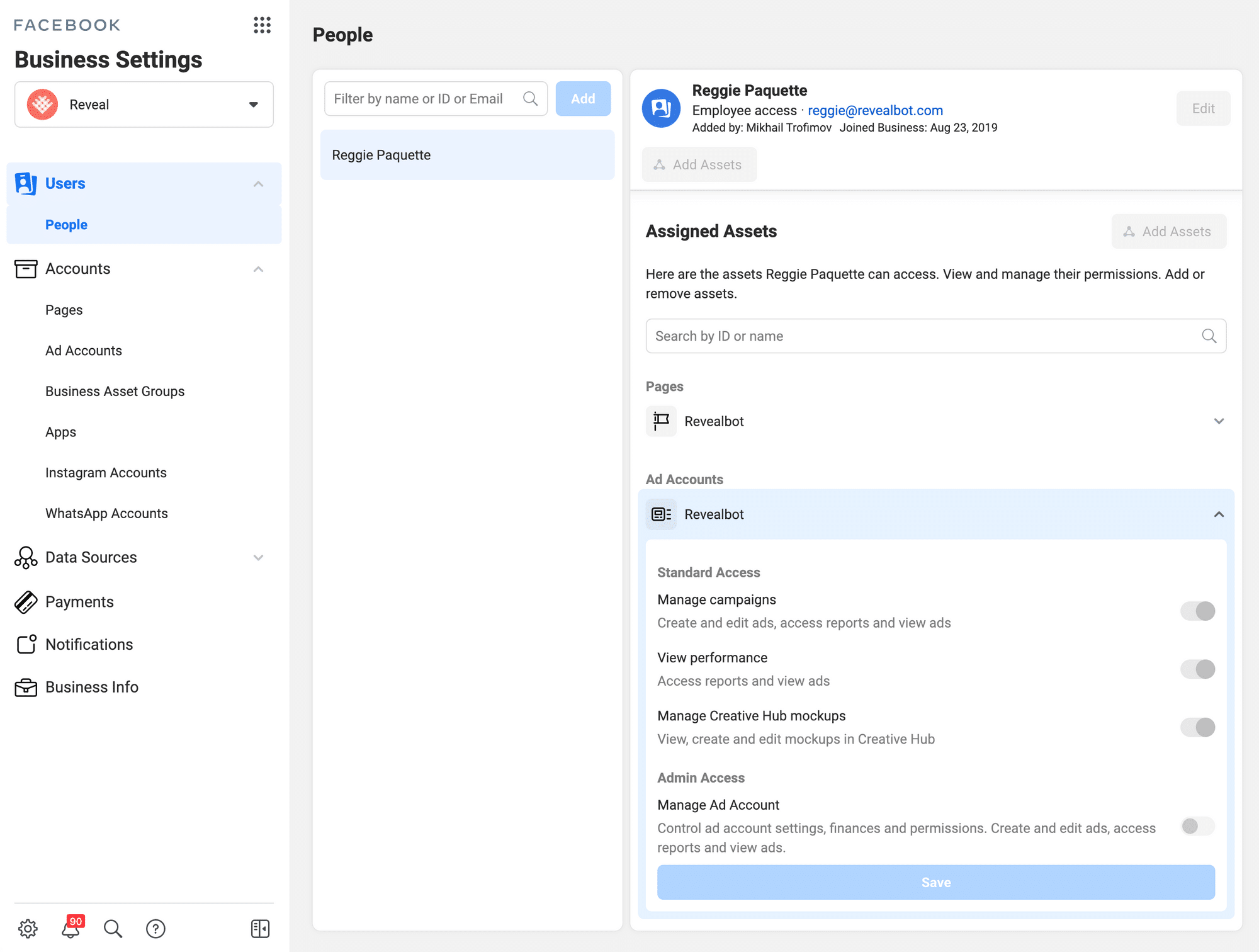
Facebook ad account

Compete Favorably…

  • Other
  • Your Game Plan
  • Build a Great Website
  • Attract the Right Attention
  • Convert Strangers into Leads
  • Track & Report Performance
  • Close Deals (Sales)
  • Trending
  • Videos


Guides

  • Website Design
  • Marketing Automation
  • Inbound Marketing
  • Search Engine Optimization
  • Market Positioning
  • Website Hosting
  • Ecommerce Websites
  • Fundraising Websites
  • Graphic Design
  • Logo Design
  • Golf Marketing
  • Web Photography
  • Web Videography


Download

value-driven-website-design


Resources

  • Website Design
  • Inbound Marketing
  • WordPress Website Hosting
  • Search Engine Optimization
  • Ecommerce Websites
  • Fundraising Websites
  • Resource Library
  • The Golf Essentials Podcast (for Business People)

Phoenix

Webdesign Phoenix, LLC
10645 N. Tatum Blvd.
Suite 200-180
Phoenix, AZ 85028
(480) 788-9755

Orlando

Webdesign Phoenix
7025 County Rd. 46A Ste. 1071-250
Lake Mary, FL 32746
(480) 788-9755
  • Web Design Services Guide
  • Looking for our W9?
  • Payment Changes

Trending Topics

  • frustrated writer at her computer
    Simple 5-Part Format for Every Article You WriteJanuary 20, 2022 - 12:25 pm
  • business meeting
    Table Stakes vs. Differentiators – How to Nail Your Value PropositionJanuary 13, 2021 - 8:26 am
  • pretty girl holding a camera
    14 Tips for Amazing Web Photos | Guide to Website PhotographyNovember 20, 2019 - 1:38 pm
  • winning market share
    Keynote: Winning Market ShareOctober 18, 2019 - 3:02 pm
  • Taking Off
    How to Build Yourself a “Content Machine”September 2, 2019 - 12:57 pm
  • content creation diagram
    Winning Attention: A Plan for Content CreationJuly 30, 2019 - 11:10 am
  • company-niche-market-position
    How (and Why) to Define Your Company’s Niche Market PositionSeptember 6, 2017 - 10:56 pm
  • inbound-marketing
    Online Marketing: How to Attract, Convert and Close CustomersFebruary 16, 2017 - 8:50 pm

Guides

  • Website Design
  • Marketing Automation
  • Inbound Marketing
  • Search Engine Optimization
  • Market Positioning
  • Website Hosting
  • Ecommerce Websites
  • Fundraising Websites
  • Graphic Design
  • Logo Design
  • Golf Marketing
  • Web Photography
  • Web Videography
© 2026 Web Design Phoenix | Phone: (480) 788-9755
  • Link to X
  • Link to Facebook
  • Link to LinkedIn
  • Web Design Orlando
  • Privacy Policy
Link to: Table Stakes vs. Differentiators – How to Nail Your Value Proposition Table Stakes vs. Differentiators – How to Nail Your Value Propositionbusiness meeting Link to: Why Consider Partnership with Web Design Phoenix? website design PhoenixWhy Consider Partnership with Web Design Phoenix?
Scroll to top Scroll to top

This site uses cookies. By continuing to browse the site, you are agreeing to our use of cookies.

OKLearn more

Cookie and Privacy Settings


How we use cookies

We may request cookies to be set on your device. We use cookies to let us know when you visit our websites, how you interact with us, to enrich your user experience, and to customize your relationship with our website.

Click on the different category headings to find out more. You can also change some of your preferences. Note that blocking some types of cookies may impact your experience on our websites and the services we are able to offer.

Essential Website Cookies

These cookies are strictly necessary to provide you with services available through our website and to use some of its features.

Because these cookies are strictly necessary to deliver the website, refusing them will have impact how our site functions. You always can block or delete cookies by changing your browser settings and force blocking all cookies on this website. But this will always prompt you to accept/refuse cookies when revisiting our site.

We fully respect if you want to refuse cookies but to avoid asking you again and again kindly allow us to store a cookie for that. You are free to opt out any time or opt in for other cookies to get a better experience. If you refuse cookies we will remove all set cookies in our domain.

We provide you with a list of stored cookies on your computer in our domain so you can check what we stored. Due to security reasons we are not able to show or modify cookies from other domains. You can check these in your browser security settings.

Other external services

We also use different external services like Google Webfonts, Google Maps, and external Video providers. Since these providers may collect personal data like your IP address we allow you to block them here. Please be aware that this might heavily reduce the functionality and appearance of our site. Changes will take effect once you reload the page.

Google Webfont Settings:

Google Map Settings:

Google reCaptcha Settings:

Vimeo and Youtube video embeds:

Privacy Policy

You can read about our cookies and privacy settings in detail on our Privacy Policy Page.

Privacy Policy
Accept settingsHide notification only